
From a blank closet to a clear direction
Outfit planning
How to Build a Wearable Outfit with an AI Outfit Generator
A practical process for using AI outfit ideas without losing your personal style, budget, comfort, or the clothes you already own.

Start with an outfit brief, not a vague prompt
An AI outfit generator can produce endless combinations, but more options do not automatically create better decisions. Start with a short brief: where you are going, what the weather is likely to be, how formal the setting is, and one thing you already own. “Dinner in early autumn, smart casual, walking between venues, with my black loafers” gives the tool a direction that “make me look fashionable” does not. The brief keeps the result connected to your real life.
Add the constraint that matters most. It could be modest coverage, a small budget, a preferred color, a work dress code, easy washing, or the need to layer. Constraints are not obstacles to creativity; they are what turn a mood board into an outfit you can actually wear. If you have a strong personal preference, such as avoiding oversized shapes or preferring monochrome looks, say it early so the suggestions become more relevant.
Anchor the idea in your existing wardrobe
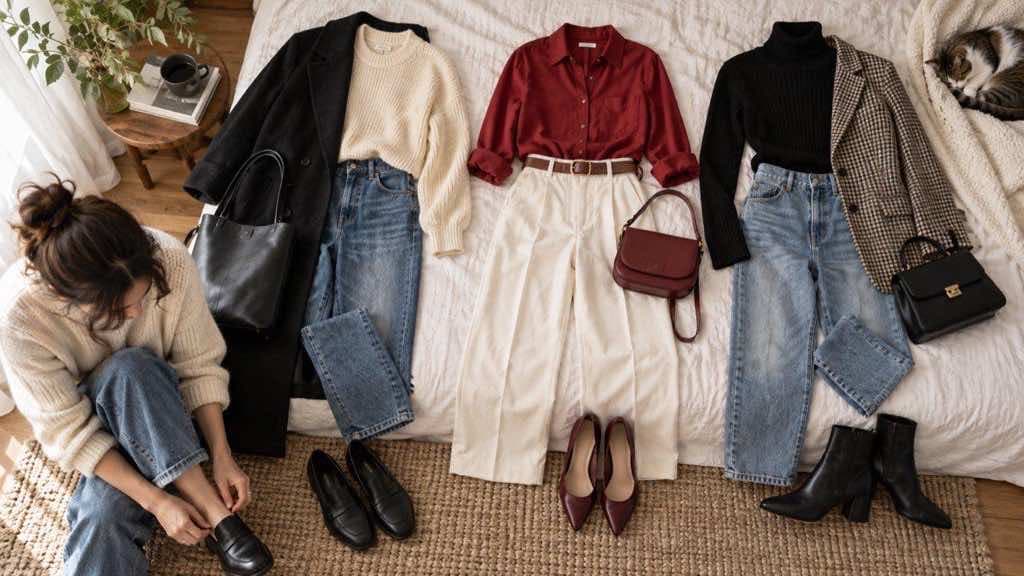
The best AI outfit ideas often begin with one item already in your closet. A favorite trouser, denim jacket, knit, sneaker, or skirt gives the rest of the look a useful center of gravity. From there, ask what could change: a lighter layer, a stronger color accent, a different shoe shape, or a more structured outer layer. This is more sustainable and more actionable than generating a completely new wardrobe every time.
If you are shopping, use the generator to define the missing role rather than to approve every item. Maybe you need a polished layer that works with three bottoms, a warm neutral knit, or a shoe that can handle walking. Once the role is clear, compare actual products by measurement, material, price, and return policy. The AI image should guide the search, not push you toward a purchase you do not need.
Build the outfit in layers
A wearable outfit usually has a visual base, a shape-defining layer, and one or two finishing choices. Start with the base: the top and bottom or the dress. Then add a layer that changes proportion, such as a cropped jacket, long coat, vest, or open shirt. Finish with shoes, bag, jewelry, or another accessory only after the silhouette feels right. This order helps you see whether the outfit works without depending on decoration.
Use contrast deliberately. Contrast can come from color, texture, proportion, or formality. A soft knit with structured trousers feels different from the same colors in two fluid pieces. A monochrome outfit can still have depth when the materials and shapes differ. If an AI result looks “fashionable” but confusing, remove one element and ask what the outfit is trying to say. Clarity is often created by editing, not adding.
가이드를 직접 적용하기
Generate outfit ideas
선명한 사진으로 시작해 몇 가지 방향을 비교하고, 다음 스타일을 결정하기 위한 시각적 참고로 결과를 활용하세요.
Generate variations that answer real questions
Instead of asking for ten unrelated outfits, create small comparisons. Keep the base garment and change the layer. Keep the color palette and change the shoe. Keep the silhouette and compare a casual version with a work-ready version. These tests reveal which part of the idea is doing the work. They also make it easier to recreate the outfit using pieces you already own.
Compare the front-view impression with the lived-in version you need. Will you sit, walk, carry a bag, work at a desk, or spend time outdoors? If the outfit is for a special event, think about photographs and movement rather than only the entrance moment. A strong styling direction survives different poses and small changes; a weak one depends on a single perfect composition.
Keep your personal style in the final edit
AI is good at remixing visible patterns, but your wardrobe has information the image does not know: what you reach for repeatedly, how you like clothes to feel, what you are willing to iron, and which colors make you feel like yourself. Use those preferences as a filter. If you love the shape but not the color, keep the shape. If you like the palette but not the amount of volume, keep the palette. The final outfit should belong to you, not to the generator.
Ask whether the suggestion can create at least three combinations with pieces you own. Repeatability is a useful test for value. One dramatic look can be inspiring, but a simple jacket that works with denim, work trousers, and a dress may contribute more to your real wardrobe. The goal is not to maximize novelty; it is to make getting dressed easier and more intentional.
Run a practical check before you commit
Before buying or packing, check weather, movement, care, and comfort. Look at the actual garment measurements and material. Make sure the shoes fit the amount of walking and the layer works with the temperature. If you are combining a new piece with an existing item, put them together physically when possible. The physical check often reveals details that an image cannot, such as static, transparency, scratchy texture, or a hem that catches on the shoe.
An AI outfit generator is most valuable when it helps you move from “I have nothing to wear” to a small set of clear choices. Start with a real brief, anchor the ideas in your wardrobe, compare controlled variations, and edit the result until it fits your life. That process produces more useful style than collecting endless images that never leave the screen.
가이드를 직접 적용하기
Generate outfit ideas
선명한 사진으로 시작해 몇 가지 방향을 비교하고, 다음 스타일을 결정하기 위한 시각적 참고로 결과를 활용하세요.